


One of the small but real frustrations in any conversation you have together is hitting send before you are actually ready. You reread it two minutes later and think: that is not quite what I meant. A few of you told us exactly that in your reviews, so we built a way to fix it.
Here's what's new in version 5.3.5.
Here's what's new in version 5.3.5.
The Feature You Asked For
From now on, you have 24 hours to change your mind on anything you've answered.
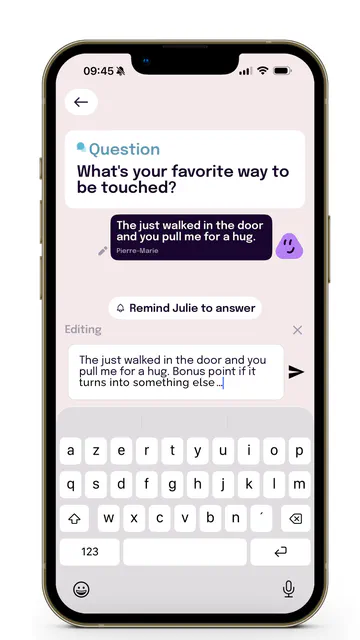
Open your message history, and you'll notice a small pencil icon on any answer you posted less than a day ago. Tap it, and the message reloads right into your text input: a clear "Editing" label lets you both know you're revising something, not starting a new thread. Change the words, hit send, and it updates the original message in place.
Your partner isn't left guessing, either. Once an answer's been changed, a quiet gray "(edited)" note appears below it in the chat history, so the conversation stays honest without turning every edit into a big announcement.
No new thread. No confusion. Just the version you actually meant.
Open your message history, and you'll notice a small pencil icon on any answer you posted less than a day ago. Tap it, and the message reloads right into your text input: a clear "Editing" label lets you both know you're revising something, not starting a new thread. Change the words, hit send, and it updates the original message in place.
Your partner isn't left guessing, either. Once an answer's been changed, a quiet gray "(edited)" note appears below it in the chat history, so the conversation stays honest without turning every edit into a big announcement.
No new thread. No confusion. Just the version you actually meant.
A Smoother Conversation, Behind the Scenes
The biggest fix in this update: your Question chats now behave like a real chat. If you or your partner send several replies, they'll appear once, in the right order, with the latest message where it belongs. No more duplicated messages, no more scrambled conversations. We also fixed the occasional off-center screen when switching back to the app mid-conversation.
Update to version 5.3.5 (564) or later to get all of this. Head to the App Store or Play Store to get the latest version.
Open NemlysA Little Extra: New Buddies Stickers
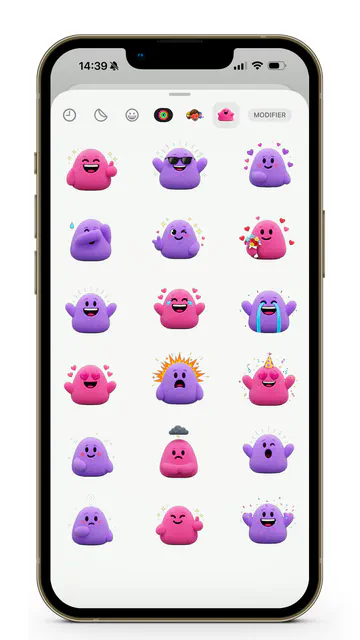
For iOS users, we also added a new pack of Nemlys buddies stickers for iMessage... for the moments a word doesn't quite cut it and a purple or pink buddy says it better.
Why This Matters for Connection
A first answer can feel permanent the moment you hit send, which sometimes means holding back, or not answering as honestly as you could. Editability removes that pressure. You can be honest first and precise second, without either of you losing track of what was actually said.
Try this: open your message history together and see if there's an answer from this week you'd word differently now. That's exactly what the pencil icon is there for.
As always, we're building Nemlys for you two. If you have thoughts or ideas, just email us at support@nemlys.com.
Try this: open your message history together and see if there's an answer from this week you'd word differently now. That's exactly what the pencil icon is there for.
As always, we're building Nemlys for you two. If you have thoughts or ideas, just email us at support@nemlys.com.
Already on 5.3.5? Try editing an old answer together on your next call, just to see how it feels.
Open Nemlys