




One of the quiet frustrations in couples apps is timing. Your partner finishes an activity, you do not notice, and the moment passes. A few days later neither of you remembers to pick it back up. Version 5.2.10 ships two features that close that gap: a notification inbox that keeps a full history of what happened in the app, and a notification preferences center so each of you can tune the alerts to actually fit your life.
The Problem We Were Solving
Nemlys is built around doing things together. A question, a game, an exercise — the experience is designed for two. But real life means your partner sometimes completes something while you're at work, in a meeting, or just not looking at your phone.
Before this update, that moment was easy to miss. There was no persistent record of what had happened, no easy way to catch up. The asynchronous rhythm that makes couples apps work in practice was getting lost.
The notification inbox fixes that directly.
Before this update, that moment was easy to miss. There was no persistent record of what had happened, no easy way to catch up. The asynchronous rhythm that makes couples apps work in practice was getting lost.
The notification inbox fixes that directly.
Your Notification Inbox
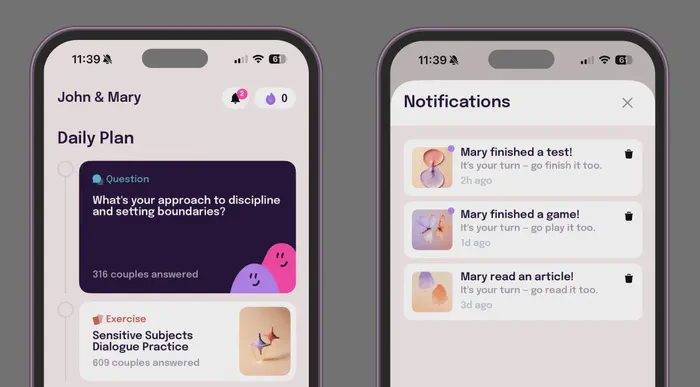
The inbox lives behind the bell icon on your home screen. Tap it and you get a scrollable history: every time your partner finished an activity, every app announcement, everything that would have otherwise disappeared into a push notification you may or may not have seen.
It is a small change with a meaningful effect. You can open the app on a Tuesday morning and see that your partner finished a game two days ago — and jump straight into it. Nothing falls through the cracks just because the timing was off.
It is a small change with a meaningful effect. You can open the app on a Tuesday morning and see that your partner finished a game two days ago — and jump straight into it. Nothing falls through the cracks just because the timing was off.
Notification Preferences Center
The other half of this release is control. Not everyone wants the same alerts. Some couples prefer a daily nudge and nothing else. Others want to know the moment their partner does something in the app.
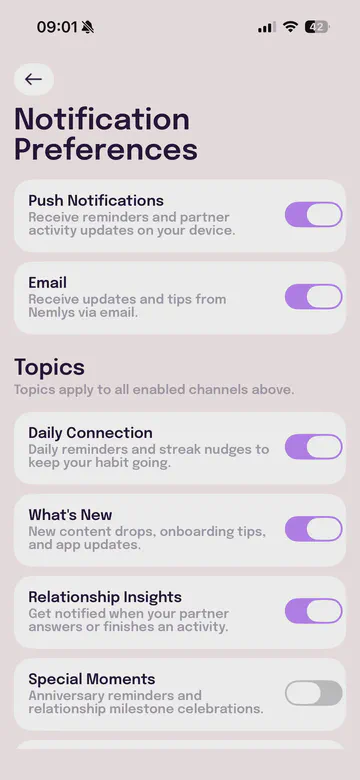
The new Notification Preferences Center — accessible from your settings — lets you decide exactly what reaches you: push notifications, email, daily reminders, partner activity updates, and more. Each toggle is yours to set independently.
The idea is simple: the app should work around your routine, not the other way around.
The new Notification Preferences Center — accessible from your settings — lets you decide exactly what reaches you: push notifications, email, daily reminders, partner activity updates, and more. Each toggle is yours to set independently.
The idea is simple: the app should work around your routine, not the other way around.
Update to version 5.2.10 or later to access the notification inbox and preferences center. Head to the App Store or Play Store to get the latest version.
Open NemlysWhy This Matters for Connection
Relationships thrive on reciprocity. When one person puts effort in and the other does not respond — even just because they did not see it — it creates a small friction that builds over time. The notification inbox makes sure that effort is visible. Your partner finishes something, you know. You can pick up where they left off, or just send a message that says you saw it.
That loop — action, visibility, response — is what keeps a shared app feeling shared rather than solo.
That loop — action, visibility, response — is what keeps a shared app feeling shared rather than solo.
Already on 5.2.10? Try this: open the inbox together on your next call and use whatever your partner finished recently as a starting point for the conversation.
Open Nemlys